Samsung Galaxy S3 sync S Planner with Outlook To dos
Jun 17th, 2012 | 2 responses | inka | Google+ | Category: Samsung Galaxy S3, Smartphone, Top StoryI already synced my Outlook calendar and schedule successfully with my Samsung Galaxy S3 S Planner. Now I want to describe how to sync the Outlook to dos with the Samsung Galaxy S3 S Planner.
Therefore I added the task “Blogyourearth.com” to my Outlook to dos, with high priority and starting tomorrow.
Afterwards I opened Samsung Kies and selected “Sync”. I choose “Sync to do with Outlook” and “Selected To do Folder”. After pressing the Sync button I have all my To dos in my Samsung Galaxy S3 S Planner. The exclamation point shows the high priority of the task.
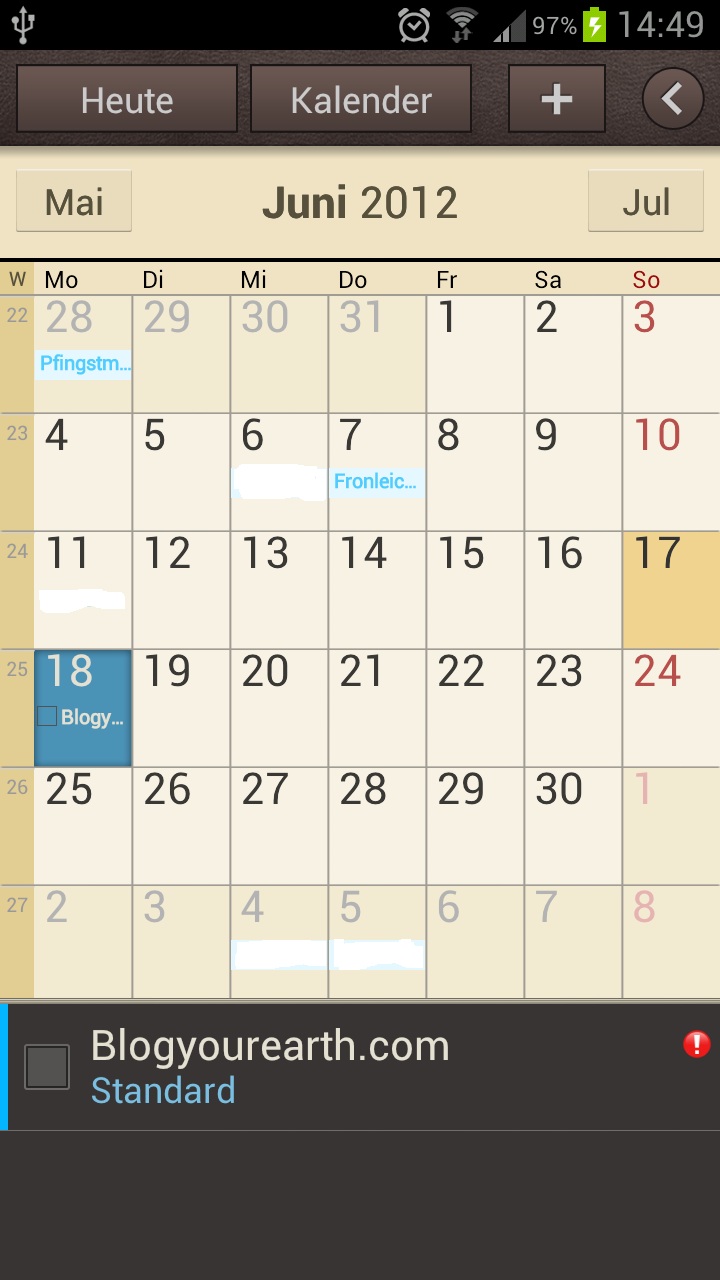
If the task is done, just tick the check box on the left and the to do is crossed out in the S Planner.
Conclusion:Â The synchronisation of my Outlook To dos work perfectly with my Samsung Galaxy S3 S Planner.
More from this category Samsung Galaxy S3 @en
- Samsung Galaxy S3 hide pictures, covers, videos in Gallery App
- Samsung Galaxy S3 – Jelly Bean update Android 4.1.1
- Transfer and sync music, photos and videos to Galaxy S3
- Samsung Galaxy S3 Kies sync with Outlook
- Sync Samsung Galaxy S3 with Outlook using MyPhoneExplorer
- Samsung Galaxy S3 – setup portable Wifi Hotspot and change password
- Samsung Galaxy S3 – deactivate auto update apps
- Samsung Galaxy S3 sync S Planner with Outlook To dos
- Samsung Galaxy S3 – Samsung Kies sync multiple Outlook calendars
- Samsung Galaxy S3 – Voice recorder 3GA file to mp3
More from this category Smartphone @en
- Samsung Galaxy Note 2 – HDTV Video Out
- Samsung Multimedia Smart Dock – EDD-S20JWEGSTA
- Samsung Galaxy Note 2 – paper cup docking station
- iPhone and Samsung Galaxy synchronization – Easy Phone Sync
- Samsung Galaxy Note 2 – setup portable Wifi Hotspot and change password
- Samsung Galaxy S3 hide pictures, covers, videos in Gallery App
- Samsung Galaxy S3 – Jelly Bean update Android 4.1.1
- Sync outlook contacts with Samsung Galaxy Note 2 using Samsung Kies
- Transfer and sync music, photos and videos to Galaxy S3
- Samsung Galaxy Note 2 – S Note with S Pan
More from this category Top Story @en
- How To Install Windows 8 from an USB Device
- Samsung Galaxy Note 2 – HDTV Video Out
- Samsung Multimedia Smart Dock – EDD-S20JWEGSTA
- ASUS N76VJ Windows 8 64 BIT – How to change the hard drive
- How to pick out the Windows 8 Product Key
- iPhone and Samsung Galaxy synchronization – Easy Phone Sync
- Samsung Galaxy S3 hide pictures, covers, videos in Gallery App
- Samsung Galaxy S3 – Jelly Bean update Android 4.1.1
- Sync outlook contacts with Samsung Galaxy Note 2 using Samsung Kies
- Samsung Galaxy Note 2 – S Note with S Pan


RSS Feed
Just get to find it out. Just to share with the reader if facing the same issue, pay attention in the S Planner when adding an appointment to select “My Calendar” instead of other calendar type.
All the best.
Hi there, did you get to sync from s planner to outlook?
Let’s suppose I add a appointment in S Planner on October 15th (Galaxy S3) and when I sync with Kies, my MS Outlook calendar (PC) doesn’t get updated.
Any idea how to sync from S3 to PC?