


The first possibility to take a screenshot from your Samsung Galaxy S3 is with the option “palm swipe to capture”. This option is enabled per default under settings / motion. But how does palm swipe to capture work? I tried it a couple of times and I did not figure out but finally I got it:
But your hand upright with your little finger on the display and move your hand from right to left or vice versa. Afterwards the typical screenshot sound comes up.
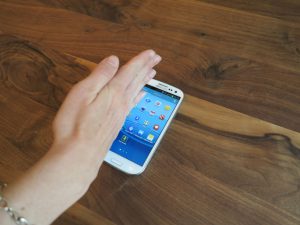
Galaxy S3 Screenshot palm swipe to capture





Wow thank you!! This has been bugging me since I got it three days ago and now I can do it!! Woohoooo 😀 thanks
Thanks for this. I was wondering if my Galaxy S3 was messing around, as i couldn’t get it to do this.
Now i know i have to be actually touching the screen when swiping, all is now working perfectly!